

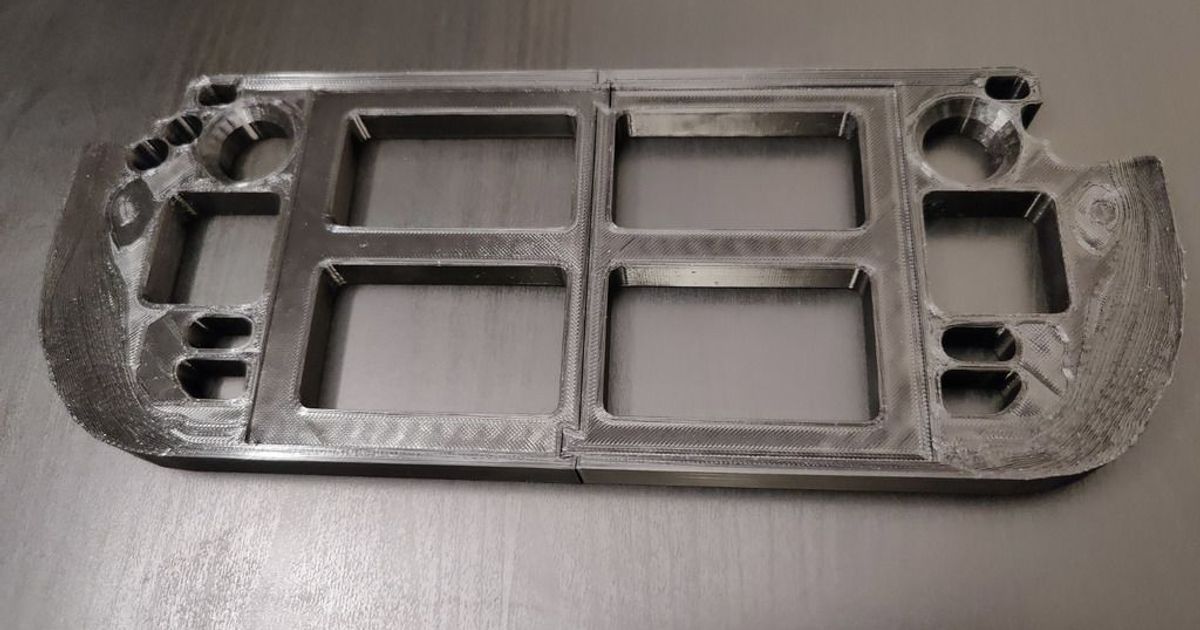
The Steam Deck Repair Jig Fixed on Printables is the kind of file that makes sense the moment you see it. Instead of balancing an opened handheld on a towel, foam block, or whatever happens to be nearby, this jig gives the Steam Deck a defined support tray while internal work happens. That matters for SSD swaps, thumbstick replacements, shell work, and other repairs where a stable resting position makes the whole job calmer.
This is a strong Featured Files candidate because it supports a real repair workflow rather than just acting as another gaming accessory. The design recreates the support concept many readers will recognize from official teardown content, and the source notes focus on corrected fit so the tray actually matches the device instead of just looking close enough in a render.
Public source signals are solid enough to support an editorial feature. During review, the Printables listing exposed roughly 314 likes, 1,884 downloads, 32 makes, around 12,412 visible views, 175 public collections, and 29 ratings averaging about 4.93. Those are strong trust signals for a repair fixture with clear reader intent and believable repeat use.
Why this Steam Deck repair jig stands out
- keeps the handheld more stable during repairs and upgrades
- fits an obvious use case that readers can understand in seconds
- supports maintenance work like SSD swaps and thumbstick service instead of adding cosmetic flair
- feels credible as an outsourced print because dimensional fit matters more than novelty
Where it makes the most sense
This is a better fit for people who already repair electronics, upgrade devices, or want a cleaner setup before opening a Steam Deck.
- home users replacing an SSD or repairing drifting sticks
- small repair benches that service gaming handhelds
- makers who want a dedicated support tray instead of improvised bench padding
- gift buyers putting together a more complete handheld repair kit
What to check before printing or ordering
- Model fit: confirm the geometry matches the original Steam Deck version you are servicing.
- Material choice: the source recommends TPU or another softer material to reduce the chance of scratching the device.
- Bench clearance: make sure the tray leaves the right ports, screw locations, and edges reachable for the repair you plan to do.
- Surface finish: for a device-facing support, cleaner edges and a consistent print matter more than decorative detail.
If you are deciding whether a downloaded repair file is worth ordering, pair this with how to screen downloaded 3D models before outsourcing, PLA vs PETG for functional parts, and wall thickness and perimeter basics.
When outsourcing makes sense
Repair jigs are exactly the kind of file many people would rather receive ready to use than dial in themselves. If the goal is getting the handheld open and back together safely, a clean print with reliable dimensions can be more appealing than test-printing your own bench aid first.
Need help from a professional 3D print farm? Reach out to JC Print Farm and they can help.
Need parts printed? Get a quote at quote.jcsfy.com. We ship globally, offer multiple materials, and keep quoting simple.
Frequently Asked Questions
Is this only useful for SSD swaps?
No. The jig is also relevant for thumbstick work, shell disassembly, and other repairs where the Steam Deck needs a defined resting position on the bench.
Why not just use a towel or foam block?
You can, but a shaped support tray is easier to trust because it keeps the device positioned more intentionally and makes the setup feel less improvised.
What material makes the most sense?
The source specifically recommends TPU or another flexible material so the tray is less likely to mark the device during use.
Related reading
- Phone Repair Stand
- Screw Organizer Box for Repairs and Disassembly
- Featured Files hub
- Downloaded-model rights and permissions guide
Ownership and print-offer note
The public source page data exposes excludeCommercialUsage: false, which is a positive signal, but this pass did not independently confirm the exact human-readable commercial license wording on the live listing. Editorial coverage is clear, while broader production rights for the exact file should still be treated as unclear until the source terms are verified directly.