

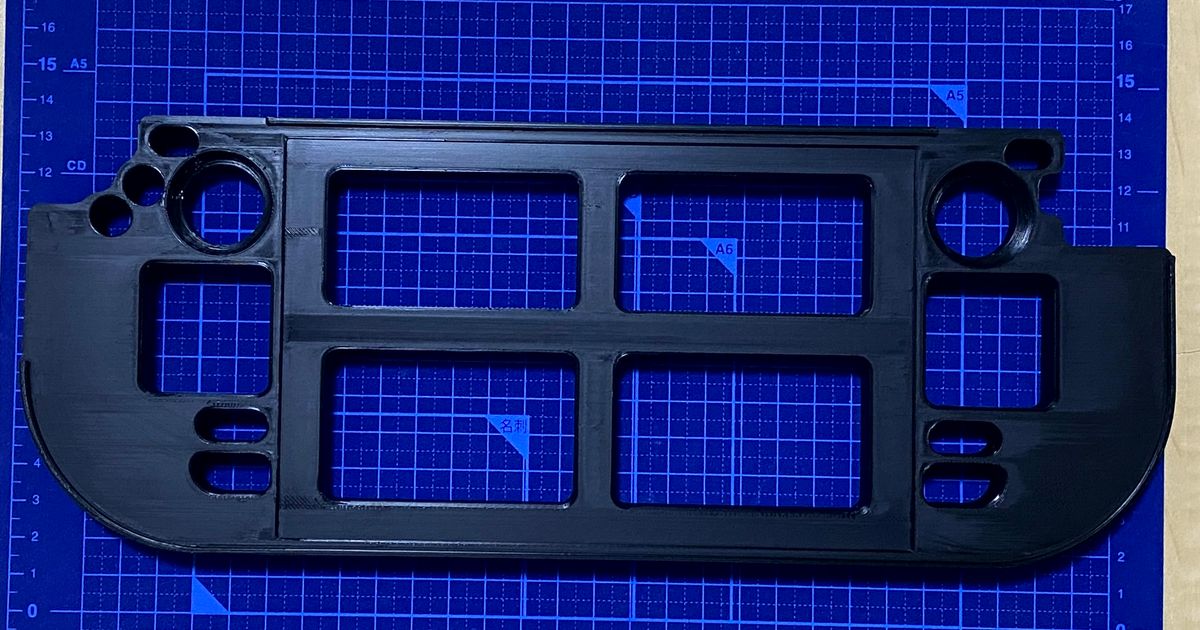
The Steam Deck Repair Jig on Printables is the kind of model that makes outsourced printing feel legitimate instead of novelty-driven. It solves a real bench problem: once a handheld is open for an SSD swap, fan replacement, thermal maintenance, trigger work, or button repair, the device needs to stay supported in one predictable position while tiny screws, ribbon cables, and internal parts get handled carefully.
That is where this file earns attention. Instead of balancing the Steam Deck on a mat, a folded towel, or a stack of improvised supports, the jig creates a dedicated service position. That makes repair work easier to stage, easier to photograph, and easier to repeat. For readers who already buy replacement SSDs, fans, shells, or sticks, a printed support like this is a believable companion tool rather than another random accessory.
The source file also has enough public proof to support a feature. During review, the Printables listing exposed roughly 62 likes, 289 downloads, 6 makes, about 1,236 visible views, 33 public collections, and 5 ratings averaging 5.0. Those are solid numbers for a focused handheld-repair fixture instead of a broad lifestyle gadget.
Why this repair jig stands out
- holds a Steam Deck steady during internal service instead of leaving the shell to wobble on the bench
- supports slower repair tasks where cable routing and screw control matter
- fits a real project-guide angle because the use case is obvious even before a reader clicks the source file
- makes sense for both home tinkerers and small repair benches that want one repeatable handheld support
Where it helps most
This is a stronger fit for people doing actual hardware work than for someone shopping for a display dock.
- SSD upgrades and storage swaps
- fan cleaning or fan replacement
- button, trigger, or shell repair
- small repair benches that already service handheld electronics
What to check before printing or ordering
- Version fit: confirm the jig geometry matches the Steam Deck model and the opening workflow you plan to use.
- Surface finish: a repair support should not leave rough contact points against the shell, so cleaner print quality matters.
- Material choice: PETG or ABS usually makes more sense than a more brittle option for a bench support that will be handled repeatedly.
- Bench workflow: if you repair more than one handheld family, think about whether this should be one dedicated tool in a wider electronics fixture kit.
If you want more support before ordering a downloaded file, pair this with how to screen downloaded 3D models before outsourcing, PLA vs PETG for functional parts, and downloaded-model rights and permissions.
Why this is a good outsourced print
Repair supports do not need flashy materials, but they do benefit from clean edges, stable geometry, and predictable dimensions. If the goal is getting the repair done rather than tuning a printer first, outsourcing the jig can be the faster move.
Need help from a professional 3D print farm? Reach out to JC Print Farm and they can help.
Need parts printed? Get a quote at quote.jcsfy.com. We ship globally, offer multiple materials, and keep quoting simple.
Frequently Asked Questions
Is this a gaming accessory or a repair tool?
It is a repair tool first. The point is to support the handheld during internal service work, not everyday play or charging.
Who is this best for?
Anyone doing Steam Deck SSD upgrades, cooling maintenance, shell work, or similar internal repairs where the device needs a stable service position.
What material makes the most sense?
PETG is a sensible baseline for a repeat-use support tool, while ABS can also make sense for users who already prefer it for bench fixtures.
Related reading
Ownership and print-offer note
This article is editorial coverage of a third-party model. Public source data exposed excludeCommercialUsage: false, which is a positive signal, but this pass did not independently confirm the exact human-readable license wording on the live listing. Content coverage is approved, while broader print-offer rights for the exact file should still be treated as unclear until the source terms are confirmed directly.
Availability note (July 31, 2026): the KOTTO ESD mat is currently unavailable. The linked replacement is a different SainSmart 20 x 14 inch silicone soldering mat with magnetic helping hands; the listing does not establish an ESD-grounding system, so use separate grounding controls where the Steam Deck service procedure calls for them.